Most websites have a content problem they don’t know about. Pages that were published years ago and never updated. Blog posts targeting the same keyword from three different angles, splitting authority instead of building it. Product descriptions thin enough to trigger quality concerns. Service pages with zero backlinks and zero traffic.
These problems from a lack of proper content strategy over time. A content audit surfaces all of it.
What a Content Audit Actually Does
A content audit is a systematic evaluation of every page on your site — what it covers, how it performs, and what should happen to it next. The outcome isn’t a report that sits in a folder. It’s a prioritized action plan: keep this, update that, consolidate these three, delete those entirely.
The goal is a leaner, stronger site where every page earns its place. Search engines reward that kind of intentionality. So do users.
The Best Content Audit Tools Worth Using
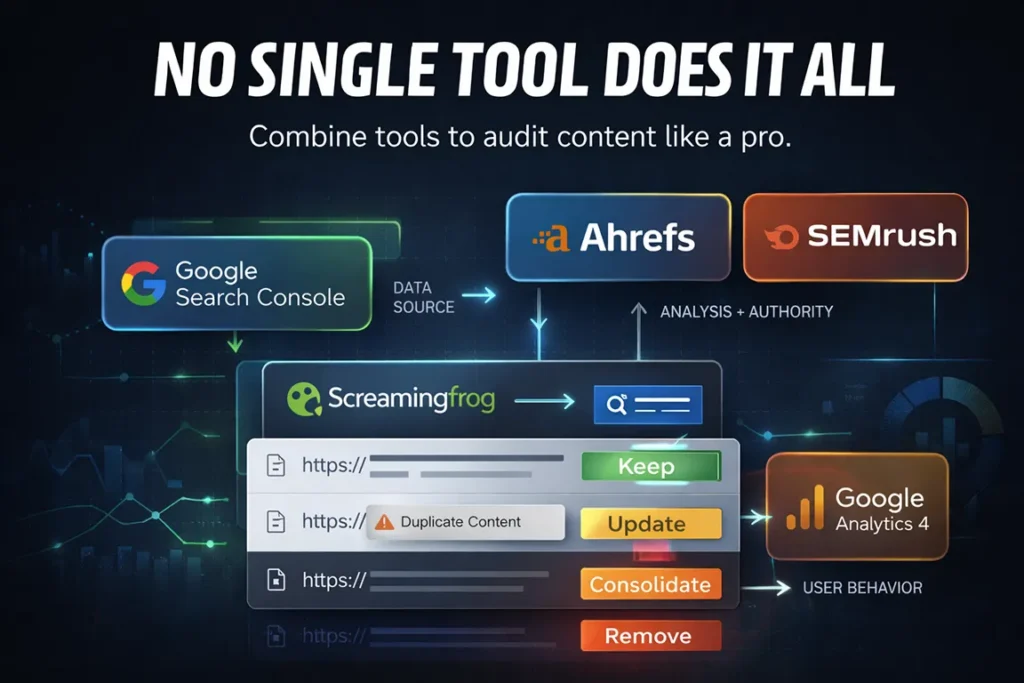
No single tool does everything, which is why most effective audits combine two or three platforms. Here’s how the most useful ones break down.
Google Search Console is the non-negotiable starting point. It shows exactly which pages are receiving impressions and clicks from organic search, which queries are driving traffic to each page, and where rankings have dropped. It’s free, it pulls data directly from Google, and it surfaces performance issues no third-party tool can replicate.
Screaming Frog SEO Spider crawls your site the way a search engine does and returns a complete inventory of every URL, along with metadata, response codes, duplicate content flags, missing title tags, and broken links. The free version handles up to 500 URLs — enough for most small business sites. Larger sites will need the paid license, which runs about $259 per year.
Ahrefs and SEMrush both offer site audit functionality that goes beyond crawling. They assess backlink profiles at the page level, flag thin content, identify keyword cannibalization, and track ranking changes over time. Either tool gives a complete picture of how individual pages contribute to — or detract from — overall domain authority. Both require paid subscriptions, but both offer trial access.
Google Analytics 4 rounds out the stack. Traffic data from Search Console tells you how pages perform in search. GA4 tells you what visitors do after they arrive — time on page, bounce behavior, scroll depth, and conversion activity. A page with strong rankings but poor engagement metrics is sending a signal worth paying attention to.
For teams running audits on a budget, Search Console and Screaming Frog’s free tier together cover the core needs.
How to Run a Content Audit Using Free Tools
Running a full content audit without a paid subscription is entirely achievable. It takes more manual work, but the process is straightforward.
Start by pulling a complete URL list. Screaming Frog’s free version will crawl up to 500 URLs and export them to a spreadsheet. For larger sites, Google Search Console’s Coverage report surfaces indexed pages, and the Sitemap section lists every URL submitted for indexing.
Next, export performance data from Google Search Console. Filter by page and pull impressions, clicks, and average position for the past twelve months. This data becomes the backbone of the audit — it tells you which pages Google is surfacing and which ones it’s largely ignoring.
Build a simple spreadsheet with one row per URL and columns for:
- Page title and URL
- Impressions and clicks (from Search Console)
- Average position
- Last updated date
- Word count (estimated or pulled from Screaming Frog)
- Action: Keep, Update, Consolidate, or Remove
Once the data is assembled, sort by impressions. Pages with high impressions but low click-through rates need better title tags and meta descriptions. Pages with decent rankings but minimal traffic often have keyword targeting issues. Pages with zero impressions over twelve months are the hardest conversation — they’re either covering a topic with no search demand or they’ve been completely overlooked by Google, and you need to figure out which.
The free tool stack won’t surface backlink data or automated content quality scores. For those, a trial period with Ahrefs or SEMrush during the audit phase can fill the gaps without committing to a full subscription.
What to Do With What You Find
The audit is only as useful as the decisions it drives. Pages generally fall into one of four categories.
Keep pages that rank well, drive meaningful traffic, and align with current business goals. These may still benefit from minor updates — refreshing statistics, adding internal links to newer content, tightening the keyword focus — but they don’t need significant work.
Update pages that have genuine ranking potential but have fallen behind. An article that ranked in the top five two years ago and has since slipped to position fourteen probably needs a content refresh: updated information, improved depth, better internal linking, and possibly a restructured header hierarchy.
Consolidate pages that are competing with each other for the same keyword. Keyword cannibalization is one of the most common and most damaging content problems an established site can have. Two posts targeting “content audit tools” with similar angles don’t double your chances of ranking — they split your authority and confuse Google about which page to surface. Pick the stronger one, absorb the best elements of the other, and redirect the weaker URL.
Remove or noindex pages that serve no user and no SEO purpose. Thin pages, outdated event announcements, tag archives with three posts — these consume crawl budget and can dilute the overall quality signals your site sends to search engines.
How Often Should You Run a Content Audit?
For most sites, a comprehensive audit once per year is a reasonable baseline. High-volume content operations — those publishing multiple times per week — benefit from a lighter quarterly review to catch cannibalization and performance drops before they compound.
The right frequency also depends on the pace of change in your industry. A legal services site covering regulations that change annually needs more frequent content reviews than a site covering timeless how-to content. When major algorithm updates roll out, running a quick performance check immediately after is always worth the time.
Frequently Asked Questions About Content Audit Tools
What are the best content audit tools for small businesses?
Google Search Console and Screaming Frog’s free tier cover the essentials without any cost. For small businesses ready to invest in a more complete picture, SEMrush’s entry-level plan or Ahrefs Lite add keyword tracking, backlink analysis, and automated site health scoring that significantly reduce the manual work involved in a full audit.
How do I run a content audit using free tools?
Export your full URL list from Screaming Frog (free up to 500 URLs) or Google Search Console, then layer in twelve months of performance data from Search Console. Build a spreadsheet that captures impressions, clicks, average position, and last updated date for each page. Sort by performance and assign each URL an action: Keep, Update, Consolidate, or Remove. It’s manual, but it works.
How long does a content audit take?
A focused audit of a 50-page site can be completed in a few hours. Sites with hundreds or thousands of pages require significantly more time — or a paid tool that automates the data collection. Most mid-size business sites fall in the four to eight hour range for a thorough manual audit.
Can a content audit hurt my site?
The audit itself doesn’t touch the site. Decisions made as a result of the audit can cause problems if executed poorly — particularly mass deletion of pages without proper redirects or consolidation done without preserving the strongest content elements. The audit is just data. What matters is how carefully the action plan is implemented.
What’s the difference between a content audit and an SEO audit?
A content audit focuses specifically on the quality, performance, and strategic alignment of your published pages. An SEO audit is broader, covering technical infrastructure, site speed, crawlability, backlink profile, and on-page optimization across the whole site. Content audits are often one component of a larger SEO audit.
Ready to Find Out What Your Content Is Really Doing?
A content audit can reveal ranking opportunities you didn’t know existed — and flag problems quietly costing you traffic every month. If you’d like expert eyes on your site’s content strategy, schedule a free strategy session with the Nozak Consulting team today.
